Depth Effect on Android: Lock Screen and Galaxy Watch
Android has no depth effect switch like the iPhone, but Galaxy phones come close with the adaptive clock and Good Lock.
Wear OS has no depth watch face built in, so 3D Photo Watch Face adds one. The time sits behind your subject, and the photo moves a little when you tilt your wrist.
What is the depth effect?
On an iPhone lock screen, the depth effect puts the clock behind the main subject of your wallpaper. A person's head or a dog's ears cover part of the digits, so the photo looks layered instead of flat.
Apple Watch does the same with its Portraits face, which uses Portrait mode photos.
Can I get the depth effect on my Android lock screen?
Partly. It depends on your phone.
- Galaxy phones: One UI 8 added an adaptive clock. It changes size and shape so it doesn't cover people or animals, and One UI 8.5 does this for all kinds of objects. The clock moves around your subject, not behind it.
- Galaxy phones with Good Lock: the LockStar module in Samsung's Good Lock app (One UI 7 or newer) lets you place a cutout of your subject over the clock. It's a real clock-behind-subject look, but you make it by hand, with a sticker.
- Pixel phones: Android 16 added Magic Portrait wallpaper effects, which frame your subject inside a shape. The clock does not go behind the subject.
- Other brands: some phones, like OnePlus, have a depth option for some clock styles in the lock screen editor.
If one of these is enough for you, use it. It's free and already on your phone.
Is there a depth effect watch face for Galaxy Watch or Pixel Watch?
Not a built-in one. Galaxy Watch has the My Photo+ face, and Pixel Watch has a Photos face that can rotate up to 30 pictures. In both, the time sits on top of your photo.
That's why I built 3D Photo Watch Face. The app runs on your Android phone and sends the face to your watch. It finds the subject for you, so normal photos work too, not only portrait mode shots.
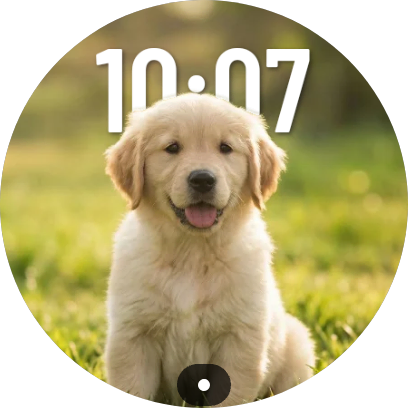
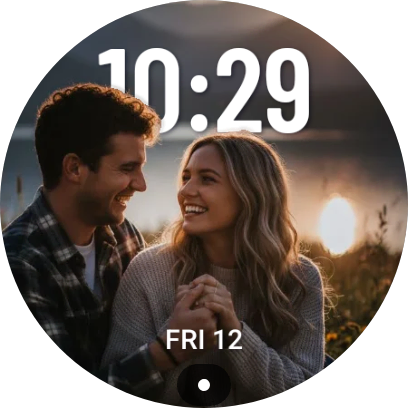
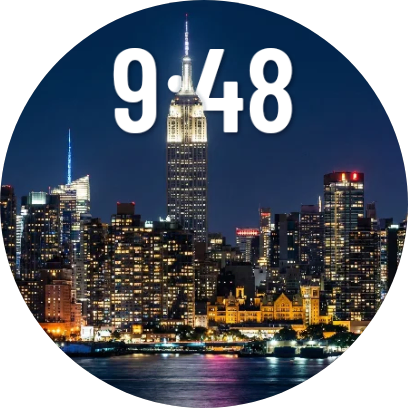
How do I put my own picture on a Galaxy Watch with the depth effect?
- Install Photo Watch Face: 3D Parallax from Google Play, on your phone and on your watch.
- Open the app on your phone and choose a photo. It finds the subject for you.
- In the Align step, place the subject and the time. Then pick a font and a color.
- Tap Push to watch.
- On your watch, open the watch face picker and select 3D Photo Watch Face.
You need a watch with Wear OS 6 or newer:
- Samsung Galaxy Watch 4, 5, 6, 7 and 8 (Classic and Pro too), Ultra and FE, after the One UI 8 Watch update
- Samsung Galaxy Watch 9 and Ultra 2, which run Wear OS 7
- Google Pixel Watch 2, 3 and 4
Phone features or the app: which one do I need?
| What you want | Native on Android | With 3D Photo Watch Face |
|---|---|---|
| Clock behind the subject on the phone lock screen | Partly: Good Lock on Galaxy, depth option on some brands | No, the app is for your watch |
| Your own photo as a watch face | Yes: My Photo+ on Galaxy Watch, Photos on Pixel Watch | Yes, with any photo |
| Time behind the subject on the watch | No | Yes, the app finds the subject for you |
| Parallax: the photo moves when you tilt your wrist | No | Yes. When idle, it shows a still always-on display |
Only want it on your phone? Check your lock screen settings. Want it on your wrist? That's what the app is for.
What should I know before installing?
- Free to try: push one watch face for free to check that it works on your watch. Pro is a one-time $1.99 (US), with no subscription.
- Private: everything runs on your phone, offline. Your photos are never uploaded.
- Easy on the battery: it uses the Watch Face Format. When idle, it switches to a still always-on display.
See the main FAQ for more answers, and the press page for the story behind the app. The 3D Photo Watch Face home page has more examples.
